Last updated: 03 October 2026 · Reading time: 4 min
Quick summary
- A name that does not match the PAN database is one of the most common reasons a registration or mapping gets stuck or rejected.
- The TRACES website offers a free PAN Verification facility for individuals, using only the PAN, date of birth and a captcha.
- Check it before applying for Income Tax or TDS registration, GST registration, ICEGATE registration or DSC mapping.
- If the name is not aligned, correct the PAN record first, then proceed with the application.
Most registrations in India are validated against the PAN database. When you apply for Income Tax or TDS registration, GST registration, an ICEGATE account or a Digital Signature Certificate (DSC) mapping, the name you type in the form is compared with the name held against your PAN. If the two do not line up exactly, the application can be rejected, held back or sent for rework, and the delay usually costs more than the registration itself.
The simple fix is to check the PAN record before you apply. The TRACES portal of the Income Tax Department provides a ready tool for exactly this purpose.
The tool at a glance
- Facility: PAN Verification (Individual) on the TRACES portal
- Link: traces.tdscpc.gov.in/auth/pan-verification/individual-pan-verification
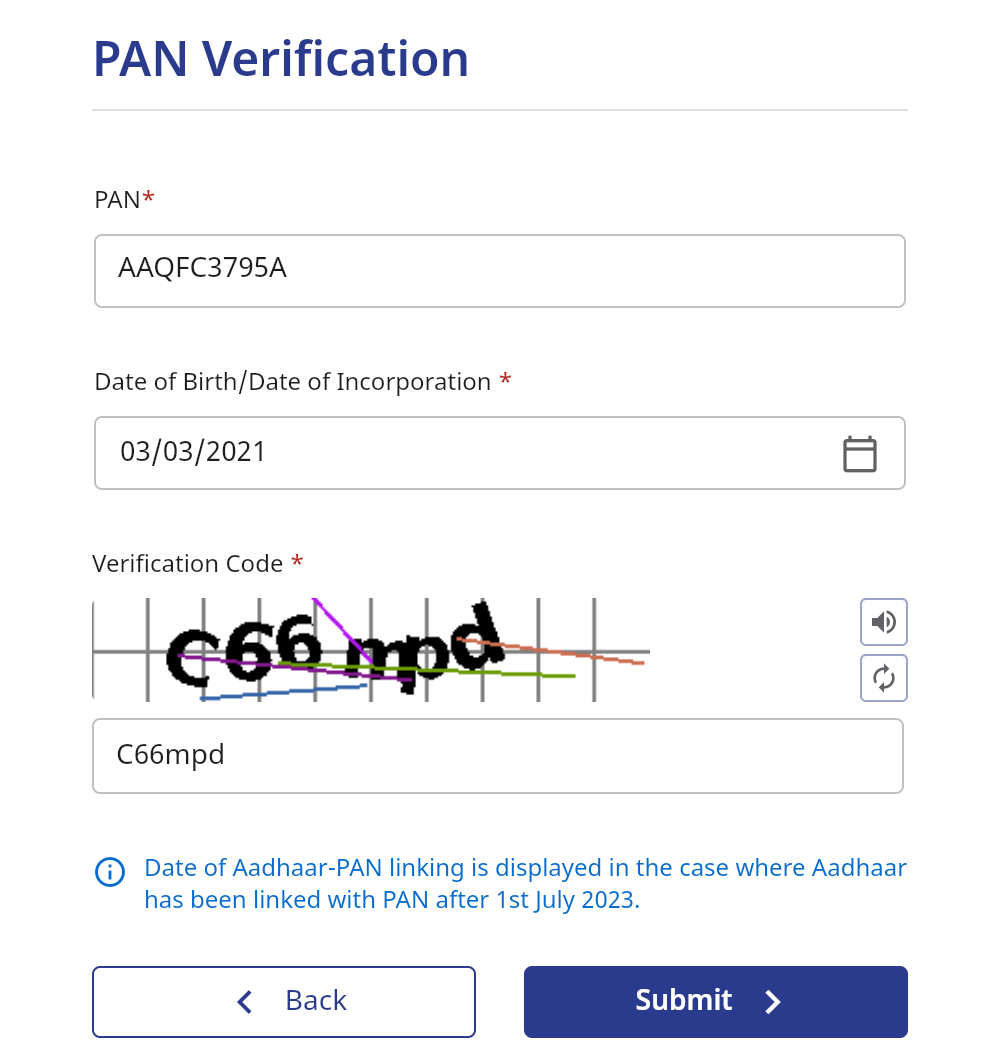
- Details asked on the page: PAN, date of birth (or date of incorporation) and the verification code (captcha)
- Cost: free of charge
- Note shown by the portal: the date of Aadhaar-PAN linking is displayed where Aadhaar has been linked with the PAN after 1 July 2023
Why a name mismatch causes trouble
A PAN record is the base identity for almost every government registration. Differences that look minor to a person are treated as a mismatch by the system, for example:
- The middle name is written in full on one document and as an initial on another.
- The surname and first name are in a different order.
- A spelling variation, a missing or extra space, or an abbreviation.
- A name changed after marriage, or after a gazette or court order, that was never updated in the PAN record.
Where you should run this check first
- Income Tax and TDS registration: the TAN, e-filing and TRACES profiles all depend on the PAN details being correct.
- GST registration: the legal name of the proprietor or the person is validated against the PAN.
- ICEGATE registration: required for import and export filings, and the PAN details must be consistent.
- DSC mapping: the certificate holder’s name must be consistent with the PAN for the DSC to map to the account.
How to use it
- Step 1. Open the TRACES PAN Verification page using the link above.
- Step 2. Enter the PAN and the date of birth (for an individual) exactly as per your records.
- Step 3. Type the verification code shown on the screen and submit.
- Step 4. Compare what the portal shows with the name on your Aadhaar, bank account and the form you are about to file.
- Step 5. If anything differs, get the PAN record corrected first. Only then start the registration.
On submitting, the portal shows a “PAN Details” box with the name held against the PAN and the PAN status. Here is the result for our own firm’s PAN:
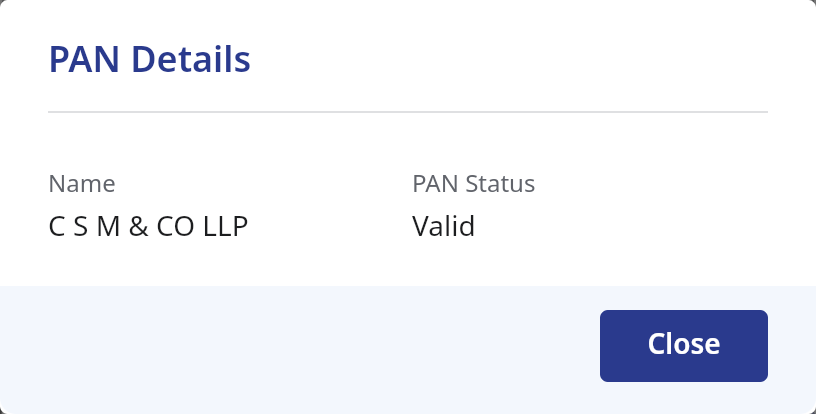
Notice how the database spells the name: C S M & CO LLP, with spaces between the letters and “CO” in capitals. This is exactly the kind of difference, compared with how we normally write “CSM & Co LLP”, that you should be aware of before filling a registration form.
Practical tips
- Use the date of birth exactly as recorded for the PAN, not as written on some other document.
- Keep the name identical across the PAN, the application form and the supporting documents.
- Do this check for each person involved, such as directors, partners and authorised signatories, when the registration is for a firm or company.
- Never share your PAN details or OTPs with anyone claiming to verify them for you. Use only the official government website.
Frequently asked questions
Q1. Do I need to log in to use this facility?
No. The page asks only for the PAN, date of birth and a captcha, as seen on the portal on 03/10/2026.
Q2. Is it only for Income Tax registrations?
No. It is useful before any registration that validates your PAN, including GST, ICEGATE and DSC mapping.
Q3. What if the name does not match?
Get the PAN record corrected through the official correction process, and wait for the update before applying for the registration.
Q4. Is there a separate check for companies and firms?
The page we reference is the individual PAN verification. For entities, verify the PAN of each individual involved and the entity details on the relevant portal.
How CSM & Co LLP can help
We handle Income Tax and TDS registrations, GST registration, ICEGATE and DSC related work for individuals, firms and companies. We run the PAN check before every application, so that name mismatches are fixed up front rather than after a rejection. Please reach out to our team and we will be happy to assist.
Disclaimer
This article is for general informational purposes only and should not be considered professional advice. Please consult a qualified expert for advice tailored to your specific situation. The author and website owner are not liable for any errors or actions based on this content.
